
Skip to product information
1 of 5

EcoFlow

EcoFlow Smart Gateway (200A)

EcoFlow Smart Gateway (200A)

Regular price $1,999.00 USD
Regular price $2,199.00 USD Sale price $1,999.00 USD
Sale Sold out
Taxes included. Shipping calculated at checkout.

EcoFlow Smart Gateway (200A)


    • Set it and forget it with 6 controlled circuits 
    • Automatically sheds non essentials for seamless backup
    • Switches under 20 ms
    • Smarter Savings up to $6,000/year 
    • Extend Backup time by up to 42%

    6 Independently Controlled Circuits · 200A Max Current · 120/240V Support

    Effortless Energy Simplicity

    EcoFlow Smart Gateway is a 200A intelligent panel with six remote-control circuits. Compatible with DELTA Pro Ultra X, solar, EV chargers, and generators, it switches in under 20 ms and automatically sheds non-essentials to extend backup—keeping your essentials running longer.


    *Note: Smart Home Panel 3 requires installation before use, and the specific fee will depend on the assessment

    Specs

    Net Weight

    65.5±0.4lb(29.7±0.2kg)

    Dimensions (HWD)

    385 × 188 × 905mm (15.16 × 7.40 × 35.63 in.)

    Overvoltage Category

    IV

    Rated Input Voltage (V)

    120/240V, 120/208V,60Hz

    Enclosure Protection

    NEMA 3R

    Operating Temperature Range

    -30~50℃(-22~122℉)

    Storage Temperature Range

    -30~50℃(-22~122℉)

    Maximum Operating Altitude

    ≤3000m(9842.52ft)

    Branch Circuit Rated Current

    60A*6 circuits output

    Maximum Branch Output for the Backup Panel

    200A

    Noise Emission

    ≤40dB

    Certificates

    UL67, UL869A, UL916, UL1741

    Warranty

    10 Years

    EMC

    FCC Part 15B

    FCC Part 15C

    Communication Method

    Bluetooth/Wi-Fi/Ethernet/CAN/RS485

    Main circuit power detection accuracy

    0.5%

    Sub circuit power detection accuracy

    1%

    Ecologically compatible products

    EcoFlow DELTA Pro Ultra Inverter/EcoFlow DELTA Pro Ultra X Inverter/PowerPulse EV Charger

    What's in the box?
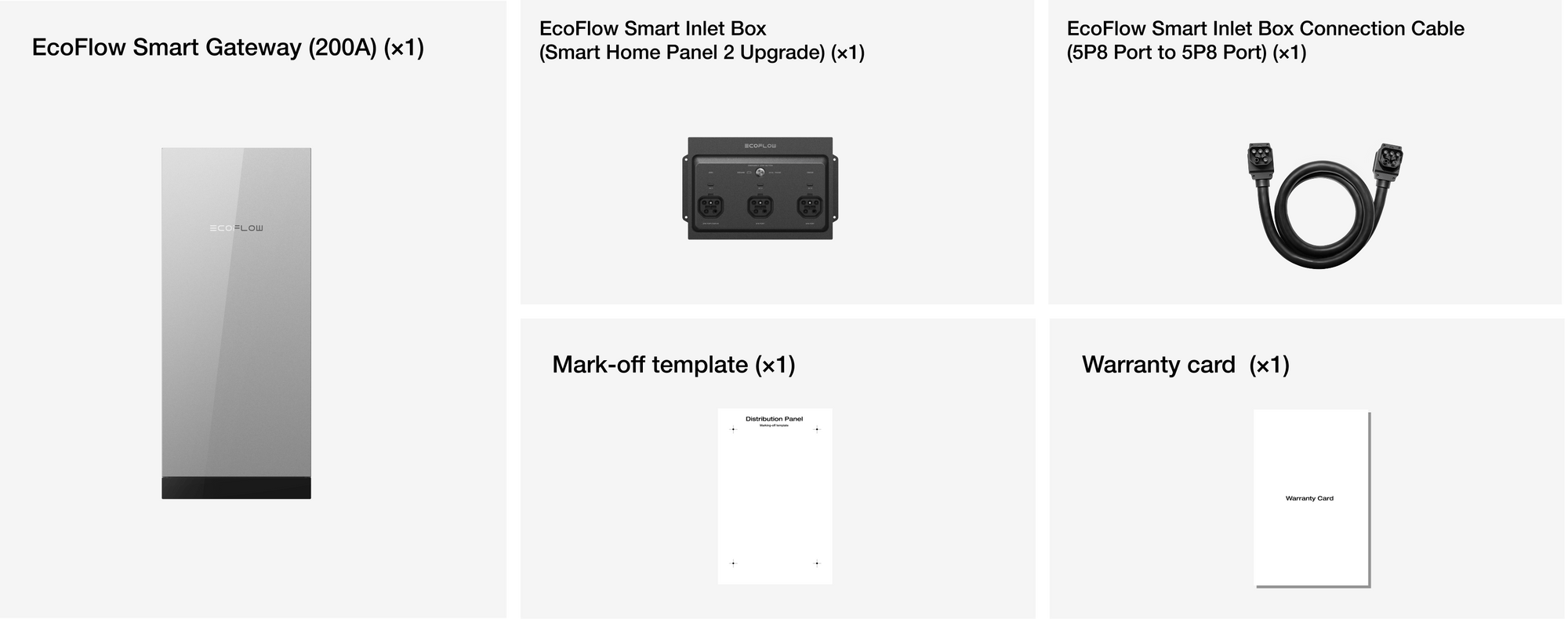
    View full details
    1 of 3

    Turn Sunlight Into Savings, NoWatt Wasted

    1 of 2
    1 of 2

    The Fastest Installation

    7 Days, 3 Steps

    1 of 3

    Resilient in Extremes, Reliable for a Decade

    Split design, Hassle-Free Install

    FAQ| DELTA Pro Ultra X

    What are the specifications of the DC input ports of the DELTA Pro Ultra X? Are there any DC output ports?

    The DC input ports and specifications of DELTA Pro Ultra X are as follows: High-PV input port: 80-500V//15A per interface, with a total maximum input of 10000W.There is no DC output port.

    What are the specifications of the DC input ports of the DELTA Pro Ultra X? Are there any DC output ports?

    The DC input ports and specifications of DELTA Pro Ultra X are as follows: High-PV input port: 80-500V//15A per interface, with a total maximum input of 10000W.There is no DC output port.

    How many battery packs can the DELTA Pro Ultra X connect to at most?

    The DELTA Pro Ultra X supports the parallel connection of up to 10 battery packs (with a single battery pack capacity of 6144kWh), which can significantly increase the backup power capacity.

    What is the UPS switching time of the DELTA Pro Ultra X?

    The UPS switching time of the DELTA Pro Ultra X is divided into two scenarios: When the DELTA Pro Ultra X operates independently: Power outage time < 10ms; When the DELTA Pro Ultra X operates in combination with the EcoFlow Smart Home Panel 3 (32 Circuits) or the Smart Gateway, the power outage switching time < 20ms.

    What should be noted when connecting old batteries (DELTA Pro Ultra series) to the DELTA Pro Ultra X?

    When connecting old batteries (with SN starting with Y712) to the DELTA Pro Ultra X, the following points must be followed: Only connect the old batteries to the rightmost Battery Port (the one farthest from the Power In/Out Port) for upgrading. Do not connect any batteries to the middle Battery Port to avoid abnormalities. Do not unplug the parallel connection cable during the upgrade process until the upgrade indicator on the screen disappears and the device restarts.

    Which ecological products is the DELTA Pro Ultra X compatible with?

    DELTA Pro Ultra X is compatible with the following products (some require additional accessories): Third-party devices: 3 - 7.2kW/12kW generators, charging piles, EV charging guns; EcoFlow products: EcoFlow Smart Home Panel 3 (32 Circuits) or Smart Gateway intelligent distribution box.

    What are the core upgrades of the DELTA Pro Ultra X compared to the previous generation of DELTA Pro Ultra?

    The total output power is increased from 7200W to 12000W; The maximum number of connectable battery packs is increased from 5 to 10; The maximum total PV input power is increased from 5600W to 10000W.

    How about the solar charging capacity of the DELTA Pro Ultra X?

    Supports two-way high-voltage PV inputs, with a voltage range of 80 - 500V for each way, a maximum working current of 15A per way, and a total power of up to 10,000W; The photovoltaic interface needs to be connected to the EcoFlow PV Switch Box (standard configuration).

    Does the DELTA Pro Ultra X require a specific way to connect the battery packs to achieve an output power of 12KW?

    Batteries need to be connected to both power-on pack ports on the Inverter. Additionally, it is recommended that the number of battery packs connected to the two ports be the same; if the number of battery packs connected to the two ports is inconsistent, the output power may not reach 12KW.

    Can the DELTA Pro Ultra X output power in bypass mode when powered through the standard AC charging cable?

    Yes, it's possible. The specification of the standard charging cable (EcoFlow AC Charging Cable (NEMA 5 - 15P to 5P8 Port)) is 15A, 120V. When charging with this cable, you can simultaneously output and carry a load from the front panel.

    Can the DELTA Pro Ultra X change the power frequency to switch between 50Hz and 60Hz?

    The frequency cannot be adjusted, and the default frequency is 60HZ. In bypass mode, the output frequency of the device is determined by the frequency of the input mains power (for example, if the mains power input is 60Hz, the output will be 60Hz; if the input is 50Hz, the output will be 50Hz).

    Does the DELTA Pro Ultra X support charging by third-party generators?

    Supported. There are two connection methods. You can directly connect to the Power in/out port via the accessory EcoFlow Generator Charging Adapter, or connect to the PV port through the EcoFlow FlowMaster Generator Rectifier [optional].

    How to reset the Bluetooth connection of the DELTA Pro Ultra X?

    When the device is turned off, press and hold the power button until the screen lights up, and then continue to hold it for about 5 seconds. When you hear the device beep twice in succession or see the device screen go off and then light up again, it indicates that the reset is successful.

    Does the DELTA Pro Ultra X support grid connection?

    It is not supported. The DELTA Pro Ultra X only draws power from the grid and will not actively transmit power back to the grid.

    FAQ| EcoFlow Smart Home Panel 3/Smart Gateway

    Which EcoFlow Portable Power Stations does the Smart Home Panel 3/Smart Gateway support connecting to? Does it support the DELTA Pro 3?

    Currently, it only supports connecting the DELTA Pro Ultra X via the EcoFlow Smart Inlet Box Connection Cable (5P8 Port to 5P8 Port) or connecting the DELTA Pro Ultra to the Smart Inlet Box (Smart Home Panel 2 Upgrade) via the EcoFlow Power Input/Output Cable. You can also connect the DELTA Pro Ultra X and the DELTA Pro Ultra simultaneously using the cables that meet the corresponding requirements.Currently, it does not support connecting the DELTA Pro 3. For future updates, please refer to the official information.

    Will the Smart Home Panel 3/Smart Gateway send the power from the Backup Battery back to the power grid? Will it affect the use of the existing photovoltaic system?

    No, the Smart Home Panel 3/Smart Gateway is not a grid-connected system. The power of the Backup Battery will only be supplied to the branch circuits inside the system and the Sub-Panel connected to the Smart Gateway, and will not be output to the power grid.The Smart Home Panel 3/Smart Gateway only indirectly utilizes the existing photovoltaic system and will not affect its original functions.

    What types of Generators does the Smart Home Panel 3/Smart Gateway support for use as Backup Power, and do I need to purchase any accessories?

    It supports 3 - 12kW split - phase 240V generators. Connect it to the AC1 - 5p8/GEN IN port of the Smart Inlet Box (Smart Home Panel 2 Upgrade) via the EcoFlow AC Generator Charging Adapter (NEMA L14 - 30P to 5P8 Port) (allowing the generator to generate 3 - 7.2kW) or the EcoFlow Generator Charging Adapter (NEMA 14 - 50P to 5P8 Port) (allowing the generator to generate 3 - 12kW). In addition, we need to remind you that you must connect at least one DELTA Pro Ultra X/DELTA Pro Ultra to the AC2/3 port of the Smart Inlet Box for the generator to generate electricity.

    What is the waterproof rating of the Smart Home Panel 3/Smart Gateway? Can it be installed outdoors?

    The protection level of the Smart Home Panel 3/Smart Gateway is NEMA 3R, which is waterproof and can be installed indoors or outdoors.However, the Smart Inlet Box (Smart Home Panel 2 Upgrade) used in conjunction with it has a protection level of NEMA 1, is not waterproof, and can only be installed indoors.

    What is the EPS mode of the Smart Home Panel 3/Smart Gateway? Can it be enabled simultaneously with the Operating modes: AI Mode, Self-powered, and Scheduled tasks?

    Enabling the EPS mode allows the system to switch to the powered-on Backup Battery within 20ms during a power outage, reducing the impact of power outages on the important loads in your home.*Note that for the EPS to take effect within 20ms, a powered-on DELTA Pro Ultra X must be included in the connected Backup Battery.*When using only the DELTA Pro Ultra, the EPS mode and Operating modes cannot be enabled simultaneously; and if the DELTA Pro Ultra is in the charging state, it cannot switch to the DELTA Pro Ultra for power supply within 20ms at the moment of a power outage.

    Does the Smart Home Panel 3/Smart Gateway support 5G WiFi connection?

    It is not supported. Only 2.4G WiFi is supported when connected via WiFi.

    Does the Smart Home Panel 3/Smart Gateway only support household electricity of 120/240V~ (split phase)? My apartment uses commercial electricity of 208Y/120V~, 3W (from 3Ø 4W). Can it be used?

    The Smart Home Panel 3/Smart Gateway supports household electricity of 120/240V~ (split phase) and commercial electricity of 208Y/120V~, 3W (from 3Ø 4W). You just need to ask your electrician to find the corresponding live wire, connect the wires according to the Installation Guide, and select the corresponding voltage in the Grid Setting of the APP.

    Who can install the Smart Home Panel 3/Smart Gateway?

    The Smart Home Panel 3/Smart Gateway must be installed by EcoFlow authorized installers and licensed electricians, and the installers must have successfully completed the EcoFlow product training. If you are interested in contacting an authorized installer, please select the Installation Service when making a purchase. If you already have installers but they haven't obtained the relevant materials for installing EcoFlow products, please go to Support->User Manual on the EcoFlow official website and download the latest Installation Guide for the corresponding product so that they can start learning and performing the installation.

    How long does it take to install the Smart Home Panel 3/Smart Gateway?

    The installation time of the Smart Home Panel 3/Smart Gateway may vary depending on the scope of work required and the current wiring configuration of your home. For most households, the Smart Home Panel 3 can be installed within 10 hours, and the Smart Gateway can be installed within 6 hours.

    How many years is the warranty for the Smart Home Panel 3/Smart Gateway?

    The warranty period for the Smart Home Panel 3/Smart Gateway is 10 years. For specific warranty terms, please refer to the "Warranty Service" Card inside the packaging box.

    How does the EcoFlow Smart Home Panel 3/EcoFlow Smart Gateway help save money?

    When your system is equipped with solar panels or your household electricity price has peak and off-peak periods, you can choose AI Mode or Self-powered Mode according to your household situation. Charge the battery during low electricity price periods or when *solar energy is predicted to be available, and use the battery to power your home during high electricity price periods or when there is redundant solar energy. In addition, you can also use the Smart Circuit Settings to turn on/off some circuits with high standby power consumption at a scheduled time, and only run them when necessary.*Solar forecast requires subscribing to the professional feature package - Energy Master. For specific subscription rules and feature details, please refer to the latest information in the APP.

    Which circuit breakers are compatible with Smart Home Panel 3/Smart Gateway?

    The Smart Home Panel 3/Smart Gateway is compatible with industry-standard single-pole and double-pole circuit breakers. For specific Main Circuit Breakers and Branch Circuit Breakers, please refer to the Circuit Breaker Compatibility section in the Installation Guide.

    Is it necessary to drill holes on the Smart Home Panel 3/Smart Gateway to reserve an entry for the cables during installation?

    There are already 5 knockouts reserved on the body of the Smart Home Panel 3/Smart Gateway. If you still need more cable holes, it is recommended that you use a hydraulic hole puncher and keep the plastic protective cover inside the machine in place during the punching process to prevent iron filings and other debris from damaging the machine during the process.

    Can the Smart Home Panel 3/Smart Gateway be used as a Sub-Panel in the home?

    Yes, but please note that when used as a Sub-Panel, you need to remove the Main bonding jumper between the Main neutral terminal and the Main ground terminal.

    If my local electrical regulations require me to install an external emergency stop switch [EPO] when installing the Smart Home Panel 3/Smart Gateway, how should I meet this requirement?

    Both the Smart Home Panel 3 and the Smart Gateway have an EPO port reserved inside the product. When you have a need, you can optionally purchase an Emergency Power Off Button when buying the main product and install it according to the Installation Guide in the Support -> User Manual on the official website.

    If my local electrical regulations require me to have an overcurrent protection device [OCPD] between the Smart Home Panel 3 or Smart Gateway and the Backup battery storage, where should I install it?

    You can install an overcurrent protection device [OCPD] in the middle of the Smart Inlet Box Connection Cable (5P8 Port to 5P8 Port). The actual OCPD specifications shall comply with your local electrical regulations. We recommend that you use a 70A 2P circuit breaker.

    Does the use of Smart Home Panel 3 or Smart Gateway have any requirements for the APP version?

    You need APP version ≥ 6.8.5 to add Smart Home Panel 3 or Smart Gateway to the APP for use.

    What are the maximum rated current and peak current of the mains input allowed by the Smart Home Panel 3/Smart Gateway respectively?

    Rated current: 160A; Peak current: 200A